One app. One full-site scan. One simple way to audit your website.
Whether you built your site yourself, worked with a developer, or hired an agency, get an independent second opinion. BetaSweep audits your entire site across desktop and mobile in a single scan. Find what needs attention, understand why it matters, and learn how to fix it—or pass it along to your developer.
Download for free. Scan for free. Get 2 free detailed reports to start.

BetaSweep doesn’t replace human expertise—it makes it better.
One scan covers five connected areas of website quality.

Designed to be easy. Built for anyone who cares about their website.
Scan when you want. Pay when it matters.
Scan any site as often as you like, free. If the scan comes back clean, you're done. If it finds something worth fixing, unlock the full report from $5, never more than $19, or subscribe if you do this a lot.
Built on Trusted Web Standards
BetaSweep doesn’t decide what counts as an issue; the standards do. It’s built on trusted engines like Lighthouse for performance, axe-core for accessibility, and HTML standards validation, with custom implementations designed for how BetaSweep works. The result is automated testing grounded in widely used web standards.
An Independent Set of Eyes
The tools that build your site won’t flag what they got wrong—and an AI-built page can look finished while hiding real problems. BetaSweep is an outside opinion that isn’t grading its own work, catching the technical issues that slip through as websites are built, updated, and maintained.
The Whole Picture. Not Just the Pieces.
Scan your entire website in both desktop and mobile views in a single pass. Find issues across all pages and templates so you can see how problems repeat and connect across your site. Learn why the whole picture matters.
Five Checks in One
Run one scan that checks accessibility, findability, performance, spelling, and HTML issues in a single report. No need to piece together results from different tools.
Stay Visible as Search Evolves
Check your site’s SEO and AI visibility, and find broken links that can hurt discoverability. See how search engines and AI tools like ChatGPT, Claude, and Perplexity understand your site—and where you can improve.
Rescan and Track Progress
Run scans anytime and compare results over time. See what improved, what changed, and what still needs attention.
White Label the App and Reports
Run BetaSweep under your own brand with your logo and colors. Deliver professional website audits to clients without putting the BetaSweep brand front and center.
Runs on Your Computer
All scans run locally for speed and privacy, keeping your website data on your machine instead of external servers. Available for macOS and Windows.
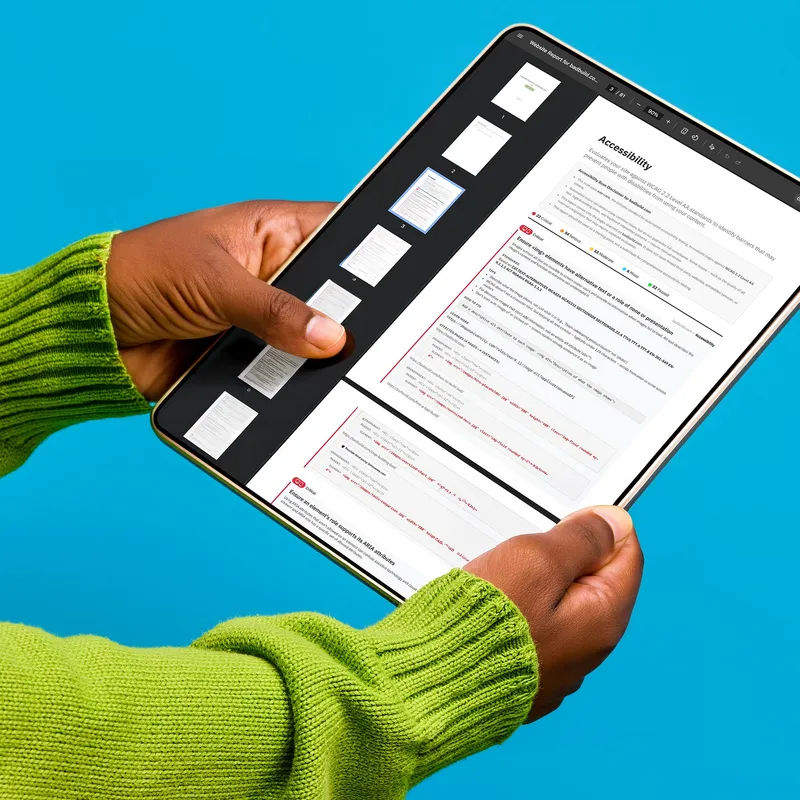
Detailed.
Shareable.
Actionable.
Every scan gives you a free overview of what was found. The detailed report shows where each issue appears, why it matters, and how to fix it, so you can move from finding issues to fixing them—or hand a clean report to the person who will. Review everything directly in the app, then export in the format that works for you. With the Unlimited plan, you can also use White Label to add your own logo and brand colors to reports you share with clients.
Export Options
- PDFClean, formatted reports ready to share with clients or teammates
- ExcelStructured data with separate sheets for each scan module
- CSVSimple data you can import into tools like Jira, Trello, or Linear

Local.
Private.
Fast.
Most website auditing platforms upload your data to their servers and charge ongoing subscription fees to cover the cost. BetaSweep takes a different approach. By running locally on your Mac or Windows computer, BetaSweep delivers:
- No uploads or cloud processing delays—BetaSweep scans directly from your computer
- Your scan data stays private because everything is processed locally
- Keep working while BetaSweep analyzes thousands of pages in the background
- If you can view it in your browser, BetaSweep can scan it—including staging environments, password-protected pages, and local development sites
Estimate Your Scan Time
Scan times depend on the website, selected scan modules, number of pages, and your computer’s performance. BetaSweep runs in the background, so you can keep working while your scan completes.
Need a Faster Scan?
By choosing the Select Pages option in BetaSweep’s scan settings, you can reduce scan times by focusing on key page types or templates instead of your entire site. This is especially useful for larger sites.
DownloadBetter accessibility. Better SEO & AI readability. Better performance. Improve one, improve all three.
Explore The Idea
Questions.
Answers.
Got questions about how BetaSweep works, what it scans, or how it fits into your workflow? You'll find quick answers below. If something isn't covered here, reach out—we're happy to walk you through it. Just email us at support@betasweep.com.
Reports are our product, so we need a way to control who gets them and to prevent abuse. We do that with an account: once you register, we give you a key that unlocks your reports. That key is tied to you, not to this computer, so anything you unlock stays yours—and once you've opened a report, you can view it again offline.
Scans are always free. Every scan includes a free overview of your website’s health. You only pay if you want to unlock the detailed report.
BetaSweep offers three ways to unlock detailed reports:
- Pay as you go with the Pay Per Report option for only $9/report.
- Single Site Unlimited is $29/month and includes unlimited detailed reports for one website.
- Unlimited is $49/month and includes unlimited detailed reports for unlimited websites, along with a white label option.
Current pricing is at betasweep.com/pricing. Payments are processed securely through Stripe.
BetaSweep takes a different approach to website auditing. Instead of treating accessibility, SEO & AI, performance, HTML validation, and website structure as separate concerns, BetaSweep analyzes your website as a complete system. Because these areas influence one another, viewing them together provides a more complete picture of your website’s overall quality.
BetaSweep is also designed to make website audits easier to understand. Every issue includes clear explanations, practical recommendations, and educational resources so you can understand what the issue means, why it matters, and how to fix it—whether you’re a developer, marketer, or business owner.
Finally, BetaSweep puts you in control. Scan any website for free, choose exactly what you want to scan, and only pay when you need the detailed results. Most websites don’t change dramatically from week to week, so there’s little value in paying for the same report over and over. With BetaSweep, you decide when it’s time to scan again and when it’s worth unlocking a report.
Anyone responsible for a website and wanting an independent second opinion. Whether you built your site yourself on Squarespace, Wix, Webflow, or another website builder, worked with a developer, or hired an agency, BetaSweep helps you understand what needs attention.
It’s useful for business owners managing their own sites, website managers and content teams handling day-to-day quality, designers checking their work against accessibility standards, and developers looking for a baseline before launch or after a deploy.
The interface is built to be readable without a technical background, while the data underneath is detailed enough for engineers and accessibility specialists to act on directly.
No. The interface is designed for non-technical users to understand what's wrong and how to prioritize fixes. Each issue includes a plain-language explanation of why it matters and, in most cases, how to fix it. Developers and specialists still get the technical details—code snippets, ancestry trees, exact rule references—without those getting in the way for everyone else.
No. You can download BetaSweep and start scanning immediately—no account, no sign-up, and no credit card. Registration is only required when you want to view a detailed report (free or paid). This lets you see your scan results before deciding whether to create an account.
Every scan includes a free overview—a high-level look at how your site performed in each module you ran, with issue counts by severity. It tells you whether your site is healthy and where problems are concentrated. If everything looks good, you're done. If you want the details, unlock the full report.
Yes. Cancel anytime from your dashboard—no phone calls, no hoops. You keep full access through the end of your current billing period, and you won't be charged again. After that, you don't lose the app—you just move back to Pay Per Report. You can still scan any website and see your free quality overview for every module, exactly like before you subscribed. And any detailed report you've already paid for stays yours to open, export, and reference whenever you need it.
A detailed report shows every issue found: the affected pages, the exact code involved, severity levels, and fix recommendations written in plain language. You can filter by severity or page, add your own notes, and export the whole thing as PDF or Excel.
BetaSweep runs on your computer, not on a remote server. This means your scans are faster, your website data stays private, and you don't have to wait in line behind other users. It also means you can scan websites that online tools can't reach—like sites that require a login, sites still in development on your local machine (localhost) or a dev server, or sites protected by a firewall. Because BetaSweep runs from your own computer, it has the same access you do when browsing normally.
Single-page scans only show part of the picture. Most websites have many pages built from shared templates, and issues often repeat across them. BetaSweep scans your entire site so you can see patterns, not just isolated problems. You can also narrow the scan to specific pages or sections when needed.
BetaSweep supports up to 5,000 pages per scan. For larger sites, you can reduce the page count by excluding paths or filtering by page type in your scan settings, or use the pre-scan's sitemap category controls to scan categories in full, sample with a single page, or exclude entirely. You can also run multiple scans to cover different sections of a site. For most modules—Accessibility, Findability, Content, and HTML Validation—scan time scales with page count, and a typical 50-page site finishes in a few minutes. Performance is the most time-intensive module because it runs a full Lighthouse audit on each page. Pages built from the same template tend to perform similarly, so you can scan a representative set of URLs to get accurate overall insights without scanning every page.
Yes. You can browse, write, and work in other apps while BetaSweep scans. One note: the Performance module measures real loading speed on your machine, so heavy tasks—video calls, large exports, gaming—can affect those scores. For the most accurate performance numbers, let the scan run without heavy work in the background.
Yes. Large scans can take an hour or more, and overnight is a great time to run them. BetaSweep keeps your computer from sleeping while a scan runs, so you can step away—or close the lid, on supported machines—and come back to finished results.
BetaSweep runs on macOS and Windows. Both versions are signed and notarized for security, and both update automatically when a new version is released.
Yes, for most things. You need a connection to scan sites on the web, sign in, and unlock reports. If you go offline, BetaSweep lets you know and pauses actions that need connectivity until you're back online.
Yes. Scans run on your computer, and your scan data stays there, encrypted at rest. Nothing about your website is sent to our servers during a scan. The only data we collect is what's needed to run your account, process payments, and reply to feedback you send us.
No. Unlike many AI-based solutions, BetaSweep checks the same page the same way every time. It doesn’t guess, interpret, or make up results.
BetaSweep's scanning engine uses industry-standard libraries like axe-core and Lighthouse as a foundation, but the whole-site scanning, cross-page analysis, result aggregation, rule enrichment, and reporting are built specifically for BetaSweep. Every page is scanned in a single automated pass, and results are consolidated across your entire site so you can see patterns and prioritize what matters most.
The "AI" in the SEO & AI module refers to what it checks for, not how it works. It evaluates whether your site is structured in a way that AI tools like ChatGPT, Claude, and Google's AI Overviews can understand and accurately represent—things like structured data, meta tags, and llms.txt.